Page 1 of 28
- Heavy duty thread
- Sewing needle
- Scissors
- Lighter or matches
- ¼ inch by 2-3 foot long metal rod
- Binder clips
Kotlin's let()
Kotlin’s standard library is a small collection of syntax sugar methods that are part of why the language is a better Java. The let() function creates a block within which the receiver is scoped, either as Kotlin’s default it or a named variable you provide. Combined with Kotlin’s safe call operator, only executing a block when you have a non-null value is concise:
1 2 3 | dao.user(id)?.let {
// Do something with the user
}
|
Cédric Beust has a follow-up post on let() in which he says that he is moving away from this usage of ?.let() in favor of regular old if-else blocks because they make it more obvious what happens on the failing side of the if, when the result of the receiver is null. I agree, but have one style of function for which I still quite like ?.let()—cache retrieval:
1 2 3 4 5 6 7 8 9 10 11 | fun getSomethingExpensive(id: Int): String? {
val cacheKey = "cache:$id"
jedis.get(cacheKey)?.let { return it }
// No cached value, do the work
val result = someExpensiveWorkFunction()
jedis.setex(cacheKey, result)
return result
}
|
I like the flow of this style; you pause to check the cache, but move on to computing the value immediately below without the extra visual complexity of assigning the result of the cache query to variable and separately checking that variable for being null.
Coding Tests
Hiring for developers is tricky business for many reasons, but one of the most contentious is assessing technical ability. Anyone who has done hiring, in particular for junior developers, has come across candidates that couldn’t write the simplest of programs. Thus we find ourselves in a world where technical interviews often involve whiteboard coding or coding tests.
Whiteboard Coding
The short summary: whiteboard coding is almost always a bad idea—it doesn’t really assess what you’re looking for.
Many interviewers, who either haven’t ever experienced whiteboard coding or who themselves possess exceptional social fortitude, think that whiteboard coding is a great way to assess a candidate’s programming ability and see how they think. Unfortunately, the unnaturalness of writing code in a stressful situation, by hand, with an audience, without being able to test it leaves many developers in a flustered state unable to think.
A year after college I was working at a job I slid into by way of prior internships. I hadn’t ever actually interviewed for a technical job. I wanted something more challenging and interesting than that position, so I applied to Google. After phone screens they invited me on site. The second interview was with a pair of programmers who wanted me to do something simple, akin to FizzBuzz.
I was incredibly flustered—I knew modular division was what was required but that wasn’t something I had done since CS1 (note: I have more fingers than times I’ve employed modular division now, in 10 years of professional software engineering). Even though it’s a trivial problem, even with very little experience, my initial surprise completely subverted my ability to even start thinking about the program critically. I started just writing things on the board and eventually stumbled through the exercise but it was clear that was the last interview.
Live Coding
“Ah-ha!”, you think, “I’ll give them a great setup to eliminate the unnatural situation of coding by hand on a whiteboard! We’ll have an interviewee laptop that they can use with the best IDE!”. That’s a great step, but doesn’t solve the biggest problem: the audience. Programming is a largely solitary activity, especially for more junior engineers. I definitely think that collaboration and things like pair programming are important, but to pretend that such a lopsided, I’m-evaluating-you-right-now arrangement is at all like pair programming is to completely misunderstand what the paradigm is about.
Beyond that, know that the technical environment you are providing is invariably unnatural as well. Developers may only have experience on Windows and you provide them with a Mac. They might work in an IDE like WebStorm or Eclipse and your setup is Sublime with a terminal. Those problems are significant enough to leave even the best developer in a state of confusion, which begets sheer terror in the interview context, but we haven’t even gotten to the biggest problem.
If you expect a developer to be able to write code in such a stressful situation the only way they will be successful and not look completely daft to even a casual observer is to allow them to write in a language that they currently use. That doesn’t mean anything from their resume, or what your company is hiring them to write, that means a language that they have actively used in the past week or two. Working in multiple languages involves a switching period to bring the correct syntax to mind—that can be a few minutes if you’ve only been out of it for a week, but can easily be tens of minutes filled with repeated web searches for the most trivial language constructs (else if or elsif? how do I for-each?). Realize that forcing a developer to ask such basic questions both poisons your opinion of them (shouldn’t you at least know that?) and puts them in a dreadful state of mind (I couldn’t even remember that!).
Finally, as we’ll get to later, any sort of coding test requires significant up-front effort on the company’s part.
Take-home coding tests
A take-home coding test solves all of the aforementioned problems. Candidates get to use an devlopment environment of their preference, aren’t under live scrutiny, and get to work in the manner that is best for them. For all of these reasons, I quite like take-home coding tests, but they rightly get a lot of hate from other developers for a few reasons.
Time
The exercise needs to be time limited and of a reasonable scope, 3-5 hours at most. That doesn’t mean saying “don’t spend more than 3-5 hours on this” in your description. I’ve seen many coding tests that stipulate a time limit, but also mention that applicants will be graded on tests, error handling, dealing with unexpected input, and documentation. Even when applied to a very small project, those tasks alone can comprise 3-5 hours of work. It is not reasonable to ask a developer applying to your company to spend more than 2-3 hours, with a very maximum cap of five, working on your test. If nothing else, you’re going to lose nearly all of them to companies without such onerous requirements.
Expectations
Having realistic and flexible expectations is paramount. No matter the developer’s level of experience, how you’re querying them, or how thorough your explanation, without the ability to ask questions in real-time your test will be misunderstood.
“But we’re a consulting shop! Our developers have to build precisely what the customer needs from a spec all the time!” you protest. Doesn’t matter—the candidate isn’t part of your work environment, hasn’t met the customer, and is working on a contrived project of highly limited scope. A coding test isn’t a good way to thoroughly test developer’s abilities to understand and implement specs.
Some will implement a totally working solution that misses the point. Others will have a great implementation but only a single simple test. For an otherwise good candidate, neither of these should be deal breakers and you absolutely shouldn’t decline them without talking to them. Schedule a call and talk to them about how they approached the problem, their interpretation of it, and what steps they took in building their solution.
Doing it right
Take-home coding tests
For junior developers, your coding test should be at the very least a full project setup: in Java land that means a pom.xml or build.gradle already stubbed out and a main method ready to receive the candidate’s code. In Ruby you might stub out the main script with calls to a class that the candidate is to write, along with a Gemfile if they’re expected to use any Gems. There are many great junior developers who haven’t ever started a new project.
Better than that, though, is to write out the entirety of the app, save for a couple of unimplemented methods or a stubbed class which the candidate is to complete. You might provide a suite of failing test cases in the framework but if not you should go ahead and create the files & classes required. See this example from Ad Hoc.
For more senior developers, it is ok to leave things much more open ended—it shouldn’t be beyond a senior developer’s skill to choose & create the layout of their project. Because it is more open ended, however, there is a much more significant burden on the company to ensure that the description of the test is comprehensive and clear. You need to provide the candidate with test input & output (more than just one parcel) that they can understand what you’re looking for. Being senior doesn’t mean they can read your mind.
How do you know if you’ve met the above? Have one of your engineers who wasn’t involved at all in the creation take the test and see how they do, both on time and how their peers evaluate the result. Needless to say, this should be on the clock—this person is your employee, not a candidate.
Live coding
For live coding, regardless of level, the arrangement should be the most fleshed-out description for junior developers above: a fully written app with a few unimplemented methods or classes that the candidate is to fill in. If they’re going to need helper methods (to parse input or some such) provide them. Again, for junior developers provide at least some tests; ask them what others they would add.
Here’s where the real burden comes in: you need this framework for a language that the candidate is accustomed to, even if it’s not the language you’re hiring for. Most companies hire developers even if they don’t regularly program in the language used at the company and a developer can only be exptected to work effectively in a language that they use regularly. You should have frameworks prepared for common languages—Java, Ruby, Python, and JavaScript is a good start for a webdev shop. If you’re more backend focused, C & Go probably replace JS. More frontend, add in Swift or Objective-C.
Know that this is still a risky proposition and you need to be understanding enough not fail a candidate just because they seem to have trouble, especially right when you start. Even with a fleshed out framework in their language of choice, remember that they’re not using a computer they’re used to and that they’re massively on display in what is normally an endeavor done alone or with someone you already know well.
Whiteboard coding
Whiteboard coding isn’t a good idea, especially for junior developers. A whiteboard coding session is more likely to select for confidence in demanding social situations than those with programming aptitude.
For senior developers, however, whiteboarding at a higher level (architecture) is a great interview tool. Describe to the candidate some real problem that your team had and ask them how they would solve it. Be prepared to give copious hints and don’t mark down candidates who need that help—it is very easy for a stressed-out candidate to misinterpret your question, even just the complexity level you’re going for, and be completely caught off guard.
JDBI Tips
I’ve been using JDBI in Java & Kotlin projects recently and have come across a few things that aren’t entirely intuitive. If you’re having trouble with JDBI, be sure to check the docs; if you don’t find an answer there, the issues on GitHub is a great place to look for more esoteric uses of the library.
Guice
I have a Dropwizard app that I use with Guice via dropwizard-guicey. While the Dropwizard docs cover using JDBI, constructing instances is a bit different with dropwizard-guicey. My (Kotlin) module for registering DAOs looks like this:
1 2 3 4 5 6 7 8 9 10 11 12 13 14 15 16 17 18 | class DaoModule : DropwizardAwareModule<AppConfiguration>() { override fun configure() { val factory = AppDBIFactory() val dataSourceFactory = configuration().dataSourceFactory val jdbi = factory.build(environment(), dataSourceFactory, "postgresql") jdbi.registerArgumentFactory(PgIntegerArrayArgFactory()) bind(DBI::class.java).toInstance(jdbi) val apiKeyDao = jdbi.onDemand(ApiKeyDao::class.java) bind(ApiKeyDao::class.java).toInstance(apiKeyDao) } } class AppDBIFactory : DBIFactory() { override fun databaseTimeZone(): Optional<TimeZone>? { return Optional.of(TimeZone.getTimeZone("UTC")) } } |
More on the PgIntegerArrayArgFactory below.
Querying Enums
JDBI’s default binding of enum arguments calls .name() on the enum object. I have enums that instead use the ordinal value in a numeric database column, so I need the binding to call .ordinal() instead. To accomplish this, I create a special binding factory, which looks a bit nasty, but it’s actual action is quite straighforward:
1 2 3 4 5 6 7 8 9 10 11 12 13 14 | @BindingAnnotation(BindStatus.StatusBinderFactory.class) @Retention(RetentionPolicy.RUNTIME) @Target({ElementType.PARAMETER}) public @interface BindWidgetStatus { class StatusBinderFactory implements BinderFactory { public Binder build(Annotation annotation) { return new Binder<BindStatus, Status>() { public void bind(SQLStatement q, BindStatus bind, Status arg) { q.bind("status", arg.ordinal()); } }; } } } |
The operative part is down in the deepest indentation—bind the ordinal value of the enum to whatever you will use as the placeholder string in the query. Then, in the DAO:
1 2 3 4 5 | @RegisterMapper(WidgetMapper::class) interface WidgetDao { @SqlQuery("SELECT * FROM widgets WHERE status = :status ") fun getWidgets(@BindWidgetStatus status: Widget.Status): List<Widget> } |
Be sure to use the same placeholder string as in the BinderFactory above (in this case status).
Array arguments
Sometimes I want to be able to select widgets in any Status. In SQL, I would use an IN clause: “...WHERE status IN (0, 1, 2)” and, with a bit more setup JDBI can do the same. First, the enum in question:
1 2 3 4 5 6 7 8 9 10 11 12 13 | data class Widget(val id: Int, val status: Status) { enum class Status { UNREAD, READ, ALL; fun queryValue(): Array<Int> { if (this == ALL) { return arrayOf(UNREAD.ordinal, READ.ordinal) } return arrayOf(this.ordinal) } } } |
And change the Binder to use the queryValue() method:
1 2 3 4 5 6 7 8 9 10 11 12 13 14 | @BindingAnnotation(BindStatus.StatusBinderFactory.class) @Retention(RetentionPolicy.RUNTIME) @Target({ElementType.PARAMETER}) public @interface BindWidgetStatus { class StatusBinderFactory implements BinderFactory { public Binder build(Annotation annotation) { return new Binder<BindStatus, Status>() { public void bind(SQLStatement q, BindStatus bind, Status arg) { q.bind("status", SqlArray.arrayOf(Integer.class, arg.queryValue())); } }; } } } |
That SqlArray is a just a POJO for holding the things to be bound:
1 2 3 4 5 6 7 8 9 10 11 12 13 14 15 16 17 18 19 20 21 22 | class SqlArray<T> { private final Object[] elements; private final Class<T> type; private SqlArray(Class<T> type, Collection<T> elements) { this.elements = Iterables.toArray(elements, Object.class); this.type = type; } @SafeVarargs static <T> SqlArray<T> arrayOf(Class<T> type, T... elements) { return new SqlArray<>(type, asList(elements)); } Object[] getElements() { return elements; } Class<T> getType() { return type; } } |
Finally, also in Java, an ArgumentFactory to bind the SqlArray values:
1 2 3 4 5 6 7 8 9 10 11 12 13 14 15 16 | public class PgIntegerArrayArgFactory implements ArgumentFactory<SqlArray<Integer>> { public boolean accepts(Class<?> type, Object value, StatementContext ctx) { return value instanceof SqlArray && ((SqlArray)value).getType().isAssignableFrom(Integer.class); } public Argument build(Class<?> type, final SqlArray<Integer> value, StatementContext ctx) { return (position, statement, ctx1) -> { Array ary = ctx1.getConnection() .createArrayOf("integer", value.getElements()); statement.setArray(position, ary); }; } } |
This is described more thoroughly on Brian McCallister’s blog. Note that he calls the above ArgumentFactory a toy, since it only binds one type (Integers). Since I only use integer array arguments so far, I’ve left it as such.
Optional arguments
Sometimes you want to have optional arguments in a DAO method, like an ID to start selecting records at. JDBI supports this, but in a non-intuitive way—you simply write the @SqlQuery to expect a possibly null value:
1 2 3 | @SqlQuery("SELECT * FROM widgets " + "WHERE (cast(:start_id AS INT) IS NULL OR c1.id <= :start_id)") fun widgets(@Bind("start_id") startId: Int?): List<Widget> |
Since this is written in Kotlin, you can see that startId is nullable. If it is null the SQL query will ignore it (the where clause is always true). More details here.
DIY Stretch Webbing Leash (à la Ruffwear® Roamer™)
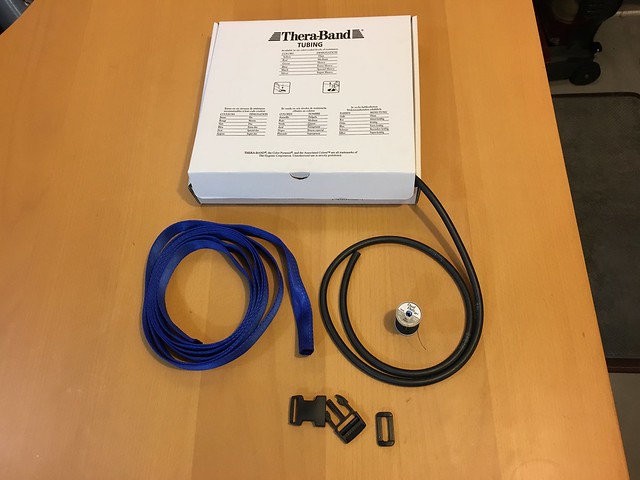
The Ruffwear® Roamer™ leash is wonderful for running and great for anytime when you have an enthusiastic dog who pulls or lurches after prey. The leash is made of tubular webbing with elastic down the center that keeps the length manageable while also softening the blows from your leash partner. Unfortunately, it isn’t very durable and the tension of the elastic is insufficient for strong dogs. My beagle-terrier-thing is only 30 pounds but is very strong and easily exceeded the Roamer™’s elastic, defeating much of the leash’s purpose. I figured I could do better.
Materials
In order to make a 6-8 foot leash, depending upon whether you’re wearing it as a belt or not, I started with a 10 foot length of one inch wide tubular webbing. I used Thera-Band surgical tubing in the black “Special Heavy” strength, which provides ample resistance for very strong medium dogs and fits well down the center of one inch webbing. Use 40% as much surgical tubing as the stretch portion of your leash—in my case the stretch portion is 6½ feet (78 inches) so the lease has 32 inches of tubular webbing.
For the handle, a side-release buckle allows you to use the leash both with a normal handle and as a belt. If you don’t care about being able to belt the leash, you could omit this and simply make a loop handle. I’ve had too many clips that open when the dog charges into a bush, so I use an automatic locking carabiner for the dog end of the leash.
Tools
Construction

Getting the slack surgical tubing threaded through the webbing, with 2.5 times as much webbing bunched up along its length, was the most difficult part conceptually, but after some trial and error I came up with a very easy solution. I found a ¼" metal rod that fit very tightly into the surgical tubing’s center. Forcing an inch worth of the tubing down over the rod makes for enough friction that you can apply quite a lot of force and stretch the surgical tubing wihtout it coming free.
With this odd arrangment setup, begin by threading the dog-end of the tubular webbing over the metal rod, and keep threading until it meets up with the open end of the surgical tubing. When those ends are lined up, secure the elastic inside of the webbing with a binder clip. Then, it’s just a process of stretching the surgical tubing and feeding more webbing over the rod and onto the tubing with it taught. I fed 6½ feet of webbing onto my 32 inches of webbing, leaving the remaining 3½ feet of webbing for constructing the handle.
Once you have all of the webbing you want bunched up on the surgical tubing, grip the tubing through the webbing near where the rod is attached to the surgical tubing very tightly and pull the rod straight out of the surgical tubing. Now it’s time to sew.

Sewing is the other important technique of this project. The surgical tubing, like most elastomers, doesn’t respond well to being cut or punctured, so it is important to avoid sending the needle through it whilst sewing. In order to keep the surgical tubing in place the technique I have settled on is crimping it tightly. Fold over the last inch of surgical tubing, and the webbing it is within, back onto itself. Secure the fold with a binder clip and then sew either side of the webbing tightly together about ¼ inch from the end of the tubing. Follow this with some stiches across the webbing. Remove hte binder clip and repeat near the folded end of the joint.
See the Flickr album for more construction details.
Optional Authentication with Dropwizard
Dropwizard provides a great framework for authentication & authorization. Authenticators do what their name implies, returning a Principal (probably your User object) that servlets can use for building responses. The Authorizer interface has a single methoed, authorize(), which takes a Principal and a string role to authorize access for. These get wrapped in an AuthFilter which extracts credentials from the requst and passed on to the Authenticator.
With the authen & authz classes in place protecting resources is easy: you simply annotate them with one of @PermitAll, @RolesAllowed, or @DenyAll. The last one does exactly what it says on the tin. A specific role or set of roles can be permitted access with the @RolesAllowed annotation, to which you pass a String or String[] of roles. @PermitAll allows any authenticated user to access the resource. What is missing here is an annotation to allow optionally authenticated resources—allowing you to customize a response for a known user but deliver a generic response to anonymous visitors.
Optionally protected resources
The Dropwizard manual gives a cursory explanation of how to implement optional authentication:
If you have a resource which is optionally protected (e.g., you want to display a logged-in user’s name but not require login), you need to implement a custom filter which injects a security context containing the principal if it exists, without performing authentication.
The process for optional resources involves two AuthFilters: one to check & process credentials for a logged-in user and a second that provides a default user. These can be hit in turn with a ChainedAuthFilter.
I’ll show the important parts of how I accomplished this with code examples written in a mix of Java and Kotlin.
Wiring
Setting up Dropwizard’s authentication involves creating an AuthFilter to which you pass the Authenticator and Authorizer that it will use. Creating a ChainedAuthFilter is easy, just pass a List<AuthFilter> with the filters in the order they should be executed. Dropwizard tries each of the AuthFilters in turn until one returns successfully.
In the application’s run() method:
1 2 3 4 5 6 7 8 9 10 11 12 13 14 15 16 17 | // Application.java ApiKeyAuthFilter apiKey = new ApiKeyAuthFilter.Builder() .setAuthenticator(apiKeyAuthenticator) .setAuthorizer(authorizer) .setPrefix("API key") .buildAuthFilter(); DefaultAuthFilter default = new DefaultAuthFilter.Builder() .setAuthenticator(defaultAuthenticator) .setAuthorizer(authorizer) .setPrefix("default") .buildAuthFilter(); List<AuthFilter> filterList = Lists.newArrayList(apiKey, default); ChainedAuthFilter chainedAuthFilter = new ChainedAuthFilter<>(filterList) environment.jersey().register(new AuthDynamicFeature(chainedAuthFilter)); environment.jersey().register(RolesAllowedDynamicFeature.class); |
The AuthFilters and their respective Authenticators are described below.
API key authentication
As mentioned, my user authentication is done with an API key that is passed in the Authorization HTTP header. The filter extracts the value and passes it to the authenticate() method of ApiKeyAuthenticator.
1 2 3 4 5 6 7 | // ApiKeyAuthFilter.kt override fun filter(requestContext: ContainerRequestContext) { val credentials = requestContext.headers.getFirst(HttpHeaders.AUTHORIZATION) if (!authenticate(requestContext, credentials, API_KEY_AUTH)) { throw WebApplicationException(unauthHandler.buildResponse(prefix, realm)) } } |
The API key authenticator checks the databse to see if the given API key exists. If the key is found, the matching User is returned; if not found, an empty Optional is returned instead.
1 2 3 4 5 6 7 8 9 10 11 | // ApiKeyAuthenticator.kt @Throws(AuthenticationException::class) override fun authenticate(credentials: ApiKey): Optional<User> { val userId = apiKeyDao.getUserIdForAccessToken(credentials.accessToken) if (userId != 0) { val user = userDao.getUser(userId) return Optional.of(user) } return Optional.empty<User>() } |
Default authentication
If API key authentication fails, either because the user provided invalid credentials or no credentials at all, then the next AuthFilter configured in the ChainedAuthFilter is invoked. Authentication for the default user doesn’t actually check anything, so Unit is passed instead of credentials:
1 2 3 4 5 6 | // DefaultAuthFilter.kt override fun filter(requestContext: ContainerRequestContext) { if (!authenticate(requestContext, Unit, "DEFAULT")) { throw WebApplicationException(unauthHandler.buildResponse(prefix, realm)) } } |
As the last authenticator to run in the chain, the DefaultAuthenticator never fails, it simply returns a default-constructed User object.
1 2 3 4 5 6 7 8 | // DefaultAuthenticator.kt @Throws(AuthenticationException::class) override fun authenticate(credentials: Unit): Optional<User> { logger.debug("Using default auth"); val user = User() return Optional.of(user) } |
Usage in servlets
The User object looks like this:
1 2 3 4 5 6 7 8 9 10 11 12 13 14 15 16 | // User.kt data class User(val id: Int, roles: List<Role>) : Principal { constructor() : this(0, emptyList()) init { var theRoles = mutableListOf<Role>() if (id != 0) theRoles.add(Role.USER) roles = theRoles.toList() } fun hasRole(role: Role): Boolean { return roles.contains(role) } } |
Which allows me to check whether valid authentication was provided within a servlet:
1 2 3 4 5 6 7 8 9 10 | // SomeResource.kt fun optionallyAuthenticatedResource(@Context context: SecurityContext) { user = context.getUserPrincipal() if (user != null && user.hasRole(Role.USER)) { // Do something for authenticated users } // Do other stuff for all users } |
Reading Devise Sessions in Java
I have a Ruby on Rails app that uses Devise for authentication and session management, the latter is really done by Warden. We are making a server-side companion for Ruby written in Kotlin & Java and want to be able to share sessions between the two runtimes.
JRuby makes this easy, allowing you to run Ruby on the JVM. While JRuby supports running entire Ruby applications, for reading sessions we simply want to embed a bit of Ruby within our Java application. This is accomplished by using JRuby Embed (AKA Red Bridge).
First, let’s look at the Ruby required to read Warden sessions. Our app stores sessions in a local databae, so we don’t have to deal with encryption or encoding. If your sessions are stored in cookies, they will be encrypted—this article should give you what you need to decrypt the session.
1 2 3 4 | s = Marshal.load(session) csrfToken = s['_csrf_token'] userId = s['warden.user.user.key'][0][0] authenticatableSalt = s['warden.user.user.key'][1] |
The operative part of this is really just one call, Marshal.load(session). That invokes Ruby’s built-in serializer, Marshal, to deserialize the session string. The subsequent lines just assign variables to make extracting the desired data in Java easier. Here is that script used in context to pull the information into Java:
1 2 3 4 5 6 7 8 9 10 | public Session getSession(String session) { container.put("session", session); container.runScriptlet(rubyScript); int userId = ((Long) container.get("userId")).intValue(); String authenticatableSalt = ((String) container.get("authenticatableSalt")); String csrfToken = ((String) container.get("csrfToken")); return new Session(userId, authenticatableSalt, csrfToken); } |
The entire Java class looks like this:
1 2 3 4 5 6 7 8 9 10 11 12 13 14 15 16 17 18 19 20 21 22 23 24 25 26 27 28 29 30 31 32 33 34 35 | import org.jruby.embed.LocalContextScope; import org.jruby.embed.LocalVariableBehavior; import org.jruby.embed.ScriptingContainer; public class SessionReader { private final ScriptingContainer container = new ScriptingContainer(LocalContextScope.CONCURRENT, LocalVariableBehavior.PERSISTENT); private final String script = "s = Marshal.load(session);" + "csrfToken = s['_csrf_token'];" + "userId = s['warden.user.user.key'][0][0];" + "authSalt = s['warden.user.user.key'][1];"; public Session getSession(String session) { container.put("session", session); container.runScriptlet(script); int userId = ((Long) container.get("userId")).intValue(); String authSalt = ((String) container.get("authSalt")); String csrfToken = ((String) container.get("csrfToken")); return new Session(userId, authSalt, csrfToken); } } class Session { private final int userId; private final String authenticatableSalt; private final String csrfToken; public Session(int userId, String authenticatableSalt, String csrfToken) { this.userId = userId; this.authenticatableSalt = authenticatableSalt; this.csrfToken = csrfToken; } } |
Using LocalContextScope.CONCURRENT allows this class to be threadsafe. JRuby creates a single runtime and shared variables for the ScriptingContainer, but separate variable mappings for each thread. The other modifier, LocalVariableBehavior.PERSISTENT, keeps the local variables around after we call runScriptlet() allowing for their retrieval back in Java land.
See the Red Bridge Examples for more information on using Ruby within Java.
Better Rails.cache Invalidation with Quick Queries
Rails provides a caching framework, built-in. Just set config.cache_store in your application.rb. The easiest way to use caching is using time-base invalidation—you compute something expensive and store it in the cache with an expiration time. The first time you try to retrieve it after the expiration, recompute & cache the new value.
1 2 3 4 5 6 7 | class Product < ActiveRecord::Base def expensive_operation Rails.cache.fetch("product/expensive_operation", expires_in: 12.hours) do LVMH::API.do_it() end end end |
Many things in the world don’t respond well to only being updated on a wallclock schedule. User profiles are viewed much more often than they are updated, meaning time-based cache expiration will cause needless regeneration of unchanged values. Furthermore, when a user does update their profile, not seeing that reflected immediately is confusing.
The first problem can be ameliorated by using very long expirations and the latter by force-expiring related cache entries when issuing updates. That last bit leaves a huge potential pitfall: forgetting to invalidate the cache when updating the value. Another approach for keeping your cache fresh is to use a quickly-retrieved value that indicates whether the cache needs to be regenerated.
In our application, user profiles show friend relationships and use that information to pull in recent comments from those friends, an expensive operation spanning many tables. One key bit that informs how much searching we need to do is those friend relationships. If the user has new friends we need to look at all of those new friend’s recent comments and build them for display. While checking the entire friends list is expensive, checking the latest change for a single user is quick.
1 2 3 4 5 6 7 8 9 10 11 12 13 14 15 16 17 18 | class FriendsAPI def get_friends(user, status) key_prefix = "friends_api:get_friends:#{user.id}:#{status}" timestamp = user.most_recent_friends_time Rails.cache.fetch("#{key_prefix}:#{timestamp}", expires_in: 1.week) do Rails.cache.delete_matched("#{key_prefix}:*") inflated_friends = [] friends = user.get_all_friends friends.each do |friend| inflated_friends << InflatedFriend.new(friend) end inflated_friends end end end |
The key here is that user.most_recent_friends_time is a fast query. The cache key is a compound of the calling-specific values (the user and the requested status) and the timestamp for the most recent friend change time. When the method is executed, Rails.cache.fetch() attempts to retrieve an entry for the last friend change time. If the user hasn’t created any new friendships since the last time the method ran (and it’s been less than one week), it’ll be in the cache. If the user has made more friends, then the cache will miss. On a miss, the first thing to do is remove any prior entries, then just do the expensive bit and return it.
Winter Tech Forum is The Finest

This past week I was in Crested Butte, Colorado at the second annual Winter Tech Forum. WTF is an Open Spaces conference, where there is no pre-planning, aside from organizing a place for the conference to happen. Attendees begin coming up with the schedule of discussions on the first day of the conference, and continue throughout as ideas flow.
See also: Dianne Marsh’s much more comprehensive summary and Chris Phelps’ writeup.
Open Spaces
The participation of everyone present, combined with the way discussions, happen is what makes WTF special. Open Spaces sessions are led by…whoever shows up. The person or people who had the idea might give a very brief introduction of their ideas on the topic or questions they are trying to explore, but from there the discussion can go anywhere. This leads to hugely informative sharing of experiences, be they technical, organizational, or otherwise. Recall illuminating conversations you’ve had with smart colleagues or friends in the tech industry and you’ve got a good idea of what the entire week at WTF is like.
People
The conference itself is only a small part of WTF. Crested Butte is a delightfully small town (1,500 people, 0.7 square miles) and most of the attendees stay within a few minutes walk of each other. Proximity is used to great effect during the progressive dinner, where each of the big houses cooks something and the whole conference ambles from one location to the next every half-hour. The traveling party makes for wonderful discussions, as you are encourage by the whirlwind of movement to meet and talk to new people. WTF is also small, this year about 35 people, meaning you can, and should, meet everyone at the conference. Though some companies are overrepresented (which speaks well of their culture), the diversity of experience makes every interaction informative.
Lightning Talks
Lightning talks are one of many highlights of WTF. The talks are five minutes, you can have whatever slides or props you want, and the topics are unconstrained. You would expect those on Kubernetes or Kotlin, but probably not the just-as-interesting ones on ski mountaineering, knitting, and Asperger syndrome. These quick introductions to a topic foster ideas that lead to later scheduled discussions, or just informative conversations with others.
Technology
Technology-wise, JVM languages are popular amongst attendees, but even there the gamut from Java to Scala (with Kotlin somewhere in between) means ideas come from all angles. Open mindedness is a key tenet of everyone, so despite the very practical inclinations, languages like Rust and Pony are exercised during the hack day. Discussions of deployment and infrastructure (where to draw the line between the two), testing strategies, and artificial intelligence round out the technical side of discussions
Organizations
How we work together is the other big focus of WTF. Creating a company that trusts its employees (Bruce’s Trust Organization or Teal) is a popular discussion topic. The best way to interview & hire for a high-functioning company was a standout session with markedly different viewpoints (particularly on coding tests) that were very informative.
Activities
The daily schedule is organized to take advantage of the beautiful surrounds of Crested Butte. Most afternoons will have a group snowshoeing or cross-country skiing around the town or on the many trails through the alpine valleys. If you like downhill skiing, the Crested Butte ski area is a short bus ride away. Some folks don’t care for the evils of nature and just hang out in one of the great rental houses—folks are very open to sharing their space, food, and quaffables.
Should you go?
If you are open minded and greatly enjoy discussions with smart people, more than being spoken to or addressing a crowd, then Winter Tech Forum is for you. Dianne Marsh of Netflix wrote a good overview of the conference, Bruce wrote about last year, and you can find a bit more on the Winter Tech Forum. The best way to figure out if WTF is for you, though, is to talk to those who have been there before. Their description will do a far better job of selling it than anything written. If you are interested in learning from the experiences of others, humble, and open minded, you’ll have a great time at WTF!
Serene night biking
I have achieved my final form for nighttime biking. In short, it is to emulate a firetruck.
Road biking
Bicycling on roads is dangerous. Cars are a lot bigger than bikes, have a lot less to lose from any sort of interation, and it shows. A lot of drivers are distracted, many are completely absent from the task at hand, and a small number are actively hostile to having anything else on the roads that are built exclusively for them. That’s just during the daytime.

Night biking can be quite a lot more risky, but the tables are turned. If you bike at night without lights or with inadequate lights, then you have no one else to blame. There is a reason cars are required to have numerous lights and reflectors at night. The speeds at which vehicles (both bikes and cars) move on the road only work safely at night when they are well lit.
Basic lights
You need 4 lights on your bike: a pair front & rear, all of which are bright (i.e. made in the past 2-3 years). If your lights were made before 2010, they’re likely just not bright enough to compete with all of the other light sources in even a semi-urban area. The Sweethome has a great simple recommendation, a Cygolite pair consisting of a 350 lumen headlight and a 2 watt tail. While this setup is perfectly adequate for relatively safe night biking to get to the level of serenity you need a second light on each end.
Up front, get one of the brighter Cygolite models (500 or 550 lumens) and for the rear a NiteRider Solas 2W. The idea here is to have a steady-burn light (the Cygoligte 500 up front and the Cygolite Hotshot in rear) to make you visually easy to track and a flashing light (the Cygolite 350 and NiteRider Solas) to attract attention whether cars are coming from front or behind.
Helmet lights
In addition to two pairs of lights on the bike, I also have a pair on my helmet. I use a CatEye Omni 5 on the back, though a CatEye Rapid 5 or other moderately bright, lightweight light would be good in this role. For the front, I have a NiteRider MiNewt USB but any lightweight, 350 lumen or greater helmet-mountable light will work. Having a light on your head is phenomenally useful for getting notice from inattentive drivers, particularly those at cross streets looking to turn.
edit: M'verygoodfriend Marshall pointed out that NiteRider Lumina Flare fills both of the helmet light roles very well.
Daytime use
Having bright-ass lights also makes biking during the day a more pleasurable experiene. Just run all of your brightest lights on flash mode (in this case, just one on each end of the bike) to get drivers attention. Since adopting this practice, particularly with the very bright NiteRider Solas rear, I now have cars that will dutifully slow down behind me and wait for a safe place to overtake.
RevoLights
RevoLights aren’t that bright—I’d guess they put out less than 100 lumens each—but they’re apparent size make them novel and eye catching. They’re expensive at $200 a set but if you ride a lot at night in urban areas, or just want to look very flash, then they’re a good addition to your night biking setup.
More info
If you want to know more or explore all of the bike light options, check out Nathan Hinkle’s Bike Light Database. These reviews started with the detailed headlight and taillight reviews from the Bicycles StackExchange blog which give a lot of information on his methodology and the vast array of options in the bike light world.
Wunderground with the LaCrosse C84612
I got a La Crosse C84612 weather station as a gift. Costco sold this model sometime last year, though now the closest thing they have is a quite expensive Oregon Scientific unit.
The La Crosse has been a great weather station for me: easy to set up, accurate reporting, and no interaction required. One of the features it came with that I was most excited about was internet connetivity. The station comes with a gateway that wirelessly (900MHz, not wifi) links up with the other components of the weather station, which also link wirelessly. Good system in theory, but it’s only set up to send data to La Crosse Alerts™, a website which I can best describe as functional.

Since the output of the gateway is simply data on the wire, I figured it’d be possible to capture the communication between the gateway and the La Crosse Alerts™ server. The first step in such a journey is to look around and see what other folks have found, and what a productive step that was this time.
I stumbled across a thread on WXForum of folks discussing the GW1000U, which is the gateway that is part of the C84612 weather station. If you read through there, you’ll see that skydvrz has put in a ton of effort and reverse engineer the communication. He has written a Windows program that takes the place of the La Crosse Alerts server, collecting data from the gateway and storing it in MySQL. Create an account on the forum and ask skydvrz for the latest code.
The best part about this replacement server is that it sends dtaa to Weather Underground, which has a much better interface for weather stations, providing history & graphs that are far superior to La Crosse’s site.